
You know your business is good. Your customers know it. But when someone nearby types “best plumber near me” or “coffee shop open now,” your competitor shows up and you don’t. That’s a local SEO problem, and it’s fixable.
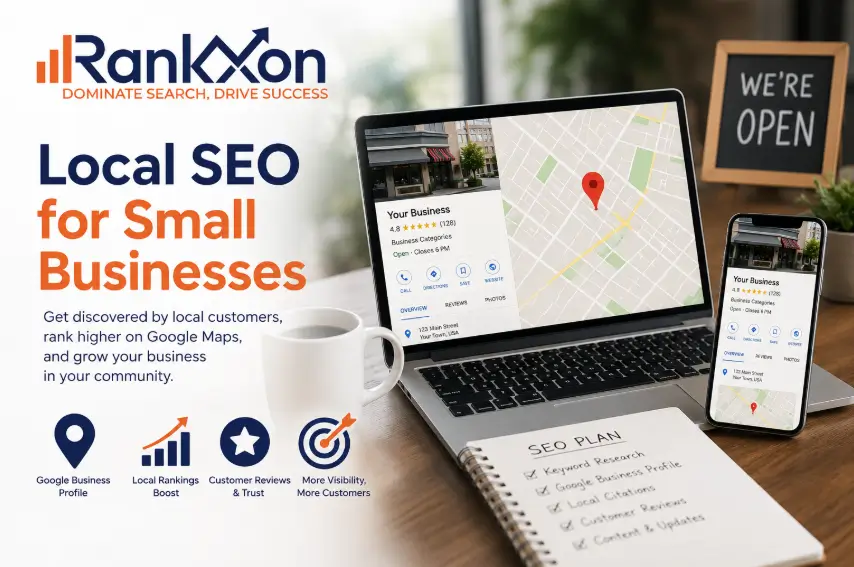
Local SEO is how small businesses show up in Google Maps, the local pack (those three business results at the top), and regular search results when nearby customers are looking. Unlike big-brand SEO, you don’t need a massive budget or a team of 10 people. You need the right setup, consistency, and a few tactics most of your competitors haven’t bothered with.
This guide breaks down exactly how local SEO works in 2026, what’s changed with AI search, and what you can do this week to start outranking competitors in your area. No fluff, no filler just what actually moves the needle.
Quick stat: 46% of all Google searches have local intent. And 76% of people who search for something nearby on their phone visit a business within a day. (Google/IPSOS)
What Is Local SEO? (And How It’s Different from Regular SEO)
Regular SEO is about ranking for topics, products, or questions regardless of where the searcher is located. Local SEO is specifically about ranking for searches tied to a place. Think “accountant in Austin” vs. “how to file taxes.”
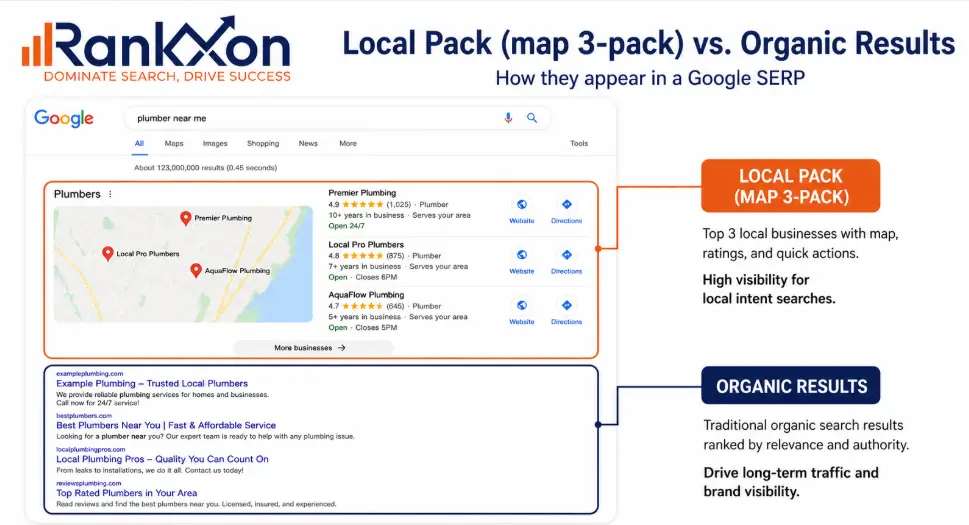
When you search for a local business or service, Google shows two types of results:
- The local pack (3 map results at the top powered by your Google Business Profile)
- Organic results (regular blue links, which also factor in location)
To win at local SEO, you need to rank in both. And the signals that matter are different from regular SEO. Google looks at how complete your GBP is, how consistent your business info is across the web, how many reviews you have, and how relevant and trusted your website is to your area.
Local SEO is not just for brick-and-mortar stores. If you serve a specific city, region, or radius even as a service-area business local SEO applies to you.
Why Local SEO Matters More Than Ever in 2026
The way people search has shifted fast. AI-powered answers, voice assistants, and zero-click results now dominate search pages. But local results are one area where Google still drives real foot traffic and phone calls because local intent is transactional and immediate.
Here’s what’s driving urgency in 2026:
- Google’s AI Overviews now often pull from Google Business Profiles and local websites to answer “near me” and “best [service] in [city]” queries. If your profile and site aren’t optimized, you won’t appear.
- ChatGPT, Gemini, and Perplexity are answering local questions too. These AI tools pull from structured data, reviews, and high-authority local pages.
- Mobile-first is no longer a future trend. Most local searches happen on phones. A slow or broken mobile site loses you customers in seconds.
- Your competitors are investing in local SEO. If you’re not, you’re falling behind without even knowing it.
The good news: most small businesses are still making the same basic mistakes. That means ranking in your local market is still very achievable if you do the fundamentals right.
Need a dedicated local SEO strategy? See Rankxon’s local SEO services for professional help.
How Google Decides Who Ranks Locally
Google uses three core factors for local rankings. If you understand these, everything else in this guide makes sense.
1. Relevance
Does your business match what the person searched for? This is driven by your GBP category, your website content, and the keywords you target. The more clearly you communicate what you do and who you serve, the better.
2. Distance
How close is your business to the searcher (or to the location they mentioned in their search)? You can’t control where you’re physically located, but you can optimize your service area settings in GBP and create content targeting specific neighborhoods.
3. Prominence
How well-known and trusted is your business? This covers your review count and rating, backlinks from local websites, mentions in local publications, and how active and complete your online presence is.
Google’s local algorithm isn’t just about one thing. You can have a perfect GBP and still rank below a competitor with 200 more reviews. These three factors work together.
Step 1: Set Up and Optimize Your Google Business Profile
Your Google Business Profile (GBP) is the single most important local SEO asset you have. It’s free, it powers your appearance in Maps, and it’s often the first thing customers see before visiting your site.
Here’s what a fully optimized GBP looks like:
- Claimed and verified: Business name, address, phone number (NAP) are exactly correct and match your website
- Category selection: Choose one primary category that best describes your main service. Add secondary categories too.
- Business description: Write 750 characters describing what you do, where you serve, and what makes you different. Use your city name naturally.
- Photos: Add at least 10 photos including your storefront, team, products, and interior. Businesses with photos get 42% more direction requests (Google).
- Business hours: Keep these accurate, including special holiday hours.
- Q&A section: Seed 5 to 10 common customer questions with detailed answers. This feeds AI overviews.
- GBP posts: Post updates, offers, and events at least once a week. This signals activity to Google.
- Messaging: Turn on messaging so customers can text you directly from search results.

For a deep-dive on this, read our full guide on Google Business Profile optimization it covers every field, photo strategy, and post types.
Step 2: Build NAP Consistency Across the Web
NAP stands for Name, Address, Phone number. Google cross-references your business information across dozens of websites and directories. If your name is “Smith’s Plumbing” on your website but “Smith Plumbing LLC” on Yelp, that inconsistency chips away at your local trust signals.
This matters more than most people realize. A study by Moz found that citation signals (including NAP consistency) make up about 7% of local pack ranking factors. Small percentage, big practical impact especially in competitive local markets.
What to standardize:
- Business name (exact same formatting everywhere)
- Street address (use “St” or “Street” consistently, not both)
- Phone number (same format: with or without country code, dashes or dots)
- Website URL (always use the same version: with or without “www”)
Where to check and fix:
- Google Business Profile
- Apple Maps
- Bing Places for Business
- Facebook and Instagram
- Yelp, TripAdvisor, Foursquare (if relevant to your niche)
- Your own website’s footer, contact page, and schema markup
Use a free tool like Moz Local or BrightLocal to scan your listings across 50+ directories and flag inconsistencies. This alone can improve rankings within 30 to 60 days.
Step 3: Get Listed in Free Local Directories (Citations)
A local citation is any online mention of your business’s NAP with or without a link back to your site. Citations from trusted directories tell Google your business is real, established, and consistent.
You don’t need hundreds of citations. You need the right ones: high-authority, industry-relevant directories and local platforms. Quality beats quantity every time.
Top free directories to claim right now:
- Google Business Profile (mandatory)
- Apple Maps (significant for iPhone users)
- Bing Places (often overlooked, still relevant)
- Yelp (high authority, customer-facing)
- Facebook Business Page
- Yellow Pages and Superpages
- Foursquare (feeds data to dozens of other platforms)
- Your local Chamber of Commerce directory
- Industry-specific directories (Houzz for home services, Avvo for lawyers, Zocdoc for healthcare, etc.)
For a full list with direct signup links, check out our guide on building local citations for free.
Step 4: Find and Use the Right Local Keywords
Local keyword research is different from regular keyword research. You’re not just looking for high-volume terms you’re looking for what your customers in your specific area type when they’re ready to buy.
How to find local keywords:
- Start with your service + city: “emergency dentist Chicago,” “roof repair Tampa”
- Add neighborhood terms: “plumber Bucktown,” “hair salon Midtown Manhattan”
- Include intent modifiers: “near me,” “open now,” “same day,” “affordable”
- Check Google’s “People Also Ask” and “People Also Search For” sections these are free keyword research tools hiding in plain sight
- Use Google Search Console to see what queries are already bringing people to your site
- Tools like Semrush, Ahrefs, or the free Google Keyword Planner can show monthly search volume
Where to use local keywords:
- H1 and H2 headings on your homepage and service pages
- Page titles and meta descriptions
- First paragraph of your page content
- Image alt text
- URL slugs (e.g., /emergency-plumber-chicago/)
- Your GBP business description and posts
Avoid keyword stuffing. If it reads awkwardly, it hurts you. One well-placed local keyword in a natural sentence does more than five forced repetitions.
Need help with this? Our keyword research service identifies exactly which local terms will drive calls, not just clicks.
Step 5: Create Location Pages That Rank
If you serve one city, your homepage can target that city. But if you serve multiple cities, zip codes, or neighborhoods, you need individual location pages one per location or service area.
What makes a location page actually work:
- Unique content for each location (don’t copy-paste with just the city name swapped)
- Include local landmarks, neighborhoods, or area-specific details
- Add a locally embedded Google Map
- Show real customer reviews from that specific area
- Include your NAP for that location
- Use location-specific headings like “AC Repair in Dallas, TX Same-Day Service”
- Add LocalBusiness schema markup (more on this in the Technical SEO section)
Generic, thin location pages the ones that just say “We serve [City Name]!” won’t rank. Google has gotten very good at spotting doorway pages with no real value. Write for the person searching, not just the algorithm.
Step 6: Get More Google Reviews (and Handle Negative Ones Right)
Reviews are one of the most powerful local ranking signals and they’re also what converts a searcher into a customer. A business with 4.7 stars and 150 reviews beats a competitor with 4.9 stars and 8 reviews in most cases, because volume signals trust.
How to get more reviews without being spammy:
- Ask right after a positive experience (in person, via text, or email)
- Create a short link directly to your Google review form (from GBP dashboard) and put it in email signatures, receipts, and follow-up texts
- Add a QR code at your location that goes to your review page
- Never offer money or gifts for reviews Google’s policies are clear on this and violations can get your listing suspended
- Train your staff to ask happy customers directly
How to handle negative reviews:
- Respond to every negative review within 24 to 48 hours
- Keep your response professional and empathetic never defensive
- Acknowledge the issue, offer to resolve it offline, and provide contact details
- A business that responds thoughtfully to a 1-star review often looks more trustworthy than one with only 5-stars and no engagement
Tip: Responding to ALL reviews positive and negative signals to Google that your business is active and engaged. This factors into your local prominence score.
Step 7: Build Local Backlinks Without Cold Outreach
Backlinks from local, relevant websites tell Google that your business is trusted in your community. You don’t need 1,000 links you need 10 to 20 solid local ones, and several ways to get them don’t involve emailing strangers.
Practical ways to earn local backlinks:
- Sponsor a local youth sports team, charity event, or school fundraiser most organizations will link to their sponsors
- Partner with complementary local businesses (a wedding photographer and a florist, for example) for cross-links
- Join your local Chamber of Commerce most have a member directory with dofollow links
- Get listed in local news publications by issuing a press release for a business milestone, new location, or community initiative
- Write a guest post for a local business blog or industry association
- Participate in local awards (“Best of [City]”) winners and nominees usually get backlinks
- Attend and speak at local events, then get listed on the event’s website
Link building doesn’t happen in a vacuum. Learn how it connects to the bigger picture in our guide on off-page SEO.
Step 8: Fix Your Technical SEO for Local Search
Technical SEO doesn’t have to be complicated. For small businesses, there are four technical areas that directly affect local rankings.
Mobile performance
Most local searches happen on a phone. If your site takes more than 3 seconds to load on mobile, you’re losing customers before they even see what you offer. Use Google PageSpeed Insights to check your score and fix the biggest issues first.
See our breakdown of page speed as a ranking factor to understand exactly how much it matters for local SEO.
LocalBusiness Schema Markup
Schema is structured data you add to your site’s code that tells Google your exact business name, address, hours, and services in a format it can read instantly. This improves your chances of appearing in rich results and AI overviews.
Minimum fields to include: @type, name, address (with streetAddress, addressLocality, addressRegion, postalCode), telephone, openingHours, and url.
Use Google’s Rich Results Test to validate your schema after adding it.
HTTPS and site security
If your site is still on HTTP, fix that now. Google has used HTTPS as a ranking signal for years, and most browsers flag insecure sites as unsafe killing conversions.
Crawlability and indexing
Make sure Google can find and index your local pages. Check your robots.txt file to confirm you’re not accidentally blocking important pages. Submit your sitemap in Google Search Console.
For a full audit of these issues, explore our technical SEO service we run a comprehensive site audit and fix everything that’s holding your rankings back.
Step 9: Optimize for Voice Search and AI Overviews
This is the section most guides ignore and it’s becoming one of the most important parts of local SEO in 2026.
Voice search
When someone says “Hey Siri, find a plumber near me,” Siri pulls from Google (or Apple Maps). Voice searches are conversational and longer than typed queries. To rank for them:
- Write FAQ-style content on your site that answers questions naturally (“How much does a furnace repair cost in Denver?”)
- Use your GBP Q&A section with complete, conversational answers
- Target question-based keywords: “who,” “what,” “where,” “when,” “how much”
AI Overviews and ChatGPT/Gemini answers
AI tools now recommend local businesses in response to queries like “best family dentist in Austin” or “most affordable electrician near downtown Seattle.” To appear in these answers:
- Have consistent, complete information across your GBP, website, and major directories
- Get cited by local news sites and high-authority local pages
- Write detailed service pages that directly answer specific questions
- Include schema markup so AI tools can read your business data easily
- Publish FAQ content that mirrors how customers phrase questions to AI assistants
Read our AI search content optimization checklist to get your content ready for both Google AI Overviews and third-party AI assistants.
Local SEO Checklist: Quick Reference Table
Use this as your go-to local SEO checklist. Print it, save it, or use it to audit where you currently stand.
| Task | Category | Priority | |
| [ ] | Claim and verify your Google Business Profile | GBP | Critical |
| [ ] | Complete all GBP fields (NAP, category, description, hours) | GBP | Critical |
| [ ] | Add 10+ high-quality photos to GBP | GBP | High |
| [ ] | Seed GBP Q&A with 5-10 questions and answers | GBP | High |
| [ ] | Post to GBP at least once per week | GBP | Medium |
| [ ] | Audit NAP consistency across all directories | Citations | Critical |
| [ ] | Claim Apple Maps, Bing Places, Yelp, Facebook | Citations | High |
| [ ] | Submit to 10+ relevant niche directories | Citations | Medium |
| [ ] | Create a short Google review link and share it | Reviews | Critical |
| [ ] | Respond to all reviews within 48 hours | Reviews | High |
| [ ] | Add location-based keywords to title tags and meta descriptions | On-Page SEO | High |
| [ ] | Create unique location pages for each city/service area you serve | On-Page SEO | High |
| [ ] | Add LocalBusiness schema markup to your website | Technical SEO | High |
| [ ] | Verify your site loads in under 3 seconds on mobile | Technical SEO | High |
| [ ] | Confirm site is on HTTPS and indexed in GSC | Technical SEO | Critical |
| [ ] | Join local Chamber of Commerce for a directory link | Backlinks | Medium |
| [ ] | Sponsor or partner with a local organization for a mention | Backlinks | Medium |
| [ ] | Add FAQ section to key service pages | AI/Voice SEO | Medium |
| [ ] | Write conversational Q&A content for voice queries | AI/Voice SEO | Medium |
Common Local SEO Mistakes Small Businesses Make
Most businesses don’t fail at local SEO because of complex algorithm changes. They fail because of avoidable basics. Here’s what to watch for.
- Inconsistent NAP across directories even a small difference (“Ave” vs. “Avenue”) can weaken your local trust signals
- Ignoring Google Business Profile after claiming it Google rewards active, updated profiles. An abandoned GBP loses ground quickly.
- Using the wrong business category choosing a broad category instead of the most specific one limits your visibility for relevant searches
- No review strategy waiting for reviews to come in naturally is too slow. You need a system to ask for them consistently.
- Keyword stuffing your GBP name adding extra keywords to your business name (e.g., “Mike’s Plumbing | Best Plumber Chicago”) violates GBP policies and can get your listing suspended
- Creating duplicate location pages with swapped city names and no real unique content Google sees through this immediately
- Ignoring mobile performance a homepage that loads in 7 seconds on a phone loses the sale before it starts
- No internal linking between related pages your service pages should link to your location pages and vice versa
Internal linking is a bigger deal than most realize. See how it connects to your on-page SEO and whether bounce rate affects rankings.
How to Track Your Local SEO Results
You can’t improve what you don’t measure. Here are the tools and metrics you should be checking every month.
Google Business Profile Insights
Inside your GBP dashboard, you can see how many people searched for your business (direct vs. discovery), how many clicked to your website, called you, or asked for directions. This is your most direct signal of local SEO performance.
Google Search Console
GSC shows which search queries are driving impressions and clicks to your site, your average position, and which pages are gaining or losing traffic. Filter by location to see city-specific performance.
Rank tracking tools
Tools like Semrush, BrightLocal, or Whitespark let you track your rankings for specific local keywords in specific cities including your position in the local pack vs. regular organic results.
Review growth
Track your total review count and average star rating month over month. A growing review count combined with a rating above 4.0 is a positive local SEO signal.
Website traffic by city
In Google Analytics 4, filter your audience data by city to see which locations are sending traffic and which pages those visitors land on.
Want a professional to handle the measurement side too? Check out our SEO consulting service for monthly reporting and strategy.
Also read: How to rank on Google Maps for a focused breakdown of Map Pack ranking specifically.
Frequently Asked Questions
How long does local SEO take to show results?
Most businesses see noticeable improvement in 60 to 90 days with consistent effort. GBP optimizations can show results faster sometimes within 2 to 4 weeks. More competitive markets take longer.
Is local SEO free?
The fundamentals (GBP, citations, basic on-page optimization) are completely free. You pay with time. If you hire a professional local SEO service, costs typically range from $300 to $2,000 per month depending on market competitiveness and scope of work.
Do I need a website for local SEO?
You can rank in the local pack without a website Google Business Profile alone can get you there. But a well-optimized website dramatically improves your organic rankings and gives customers a place to learn more, book, or contact you.
How many Google reviews do I need to rank?
There’s no magic number. In a low-competition market, 15 to 20 reviews might be enough. In a competitive city with many businesses in your category, you might need 100+. Focus on consistently adding reviews rather than hitting a specific target.
Can I do local SEO for multiple cities?
Yes. Create individual service area or location pages for each city you want to rank in. Don’t create duplicate pages each page needs genuinely unique, useful content for that specific area.
Does bounce rate affect my local SEO rankings?
Bounce rate itself isn’t a direct ranking signal, but the engagement signals it represents (time on site, pages visited) do matter. Read our analysis of bounce rate and Google rankings for the full picture.
Start With One Step Today
Local SEO doesn’t require a massive overhaul overnight. The businesses that consistently outrank their competitors aren’t doing anything exotic they’re just doing the fundamentals better and more consistently.
Start with your Google Business Profile. Get it fully filled out, add photos, and ask three customers this week for a review. That alone puts you ahead of 80% of your local competition.
Then work through this guide section by section. Each step builds on the last. Citations make your GBP stronger. Reviews make your citations more trusted. Local pages make your keywords work harder. It compounds.
Local SEO is a long-term investment but it’s one of the best investments a small business can make. Paid ads stop the moment you stop paying. Local SEO keeps working.
If you’d rather have someone handle this for you while you focus on running your business, Rankxon’s local SEO service is built specifically for small businesses that want real, measurable growth in local search.
