



Most ecommerce stores do not lose organic traffic because their products are bad. They lose it because Google cannot clearly understand their category pages, and shoppers cannot find what they came to buy fast enough.
A category page is not just a product grid. It is the page that connects search demand, product discovery, internal links, and revenue. When it is built well, it can rank for broad commercial keywords, pass authority to product pages, and guide buyers toward the right choice.
This guide breaks down category page SEO in a simple way. You will learn how to plan the page, choose keywords, write useful copy, handle filters, add schema, improve internal links, and make the page easier for AI search tools to understand.

What Is Category Page SEO?
Category page SEO is the process of improving ecommerce category, collection, or listing pages so they rank for product group keywords. These pages usually target broad commercial searches such as running shoes, office chairs, wedding dresses, laptop bags, or organic dog food.
A good category page helps three audiences at the same time. Shoppers use it to compare products. Google uses it to understand your store structure. AI search tools use it to extract direct answers, product context, and relationships between categories.
This is why category page SEO is different from normal blog SEO. A blog post answers a question. A category page must answer the question and move the visitor closer to a purchase.
Why Category Pages Matter More Than Most Ecommerce Blog Posts
Blog posts are useful for education, but category pages usually sit closer to money. A person searching how to clean leather boots may not be ready to buy today. A person searching leather boots for men is already comparing options.
That is the value of ecommerce category page SEO. It targets users who know the product type but have not chosen the exact item yet. These users are often in the comparison stage, which makes the category page a powerful landing page.
Strong category pages also improve crawl paths. When your main category links to subcategories and products in a clean way, search engines can discover deeper pages more easily. This gives your full store a better structure.
Category Page vs Product Page vs Collection Page
Many ecommerce teams mix these pages together. That creates weak keyword mapping and duplicate intent. Use this table to separate each page type before optimization.
| Page Type | Main Purpose | Keyword Intent | SEO Role |
| Category page | Groups similar products | Broad commercial | Ranks for product group terms |
| Subcategory page | Narrows the category | More specific commercial | Captures long search terms |
| Product page | Sells one item | Specific product or model | Converts ready buyers |
| Collection page | Groups by theme, season, brand, or use case | Trend or use based | Supports merchandising and long tail searches |
How to Choose the Right Keyword for a Category Page
Start with the way buyers search, not the way your team names products internally. A store may call a category performance footwear, but shoppers may search running shoes, trail running shoes, or waterproof running shoes.
The primary keyword should describe the full product group. Secondary keywords should cover use cases, attributes, materials, brands, sizes, and buyer concerns. This lets the page rank for more than one phrase without sounding forced.
For deeper research, map each major category with search volume, intent, ranking difficulty, and revenue value. This is where professional keyword research helps because it prevents the same keyword from being targeted by multiple pages.
Recommended internal resource: keyword research
Simple Keyword Mapping Example
| Page | Primary Keyword | Secondary Terms | Avoid Targeting |
| Main category | running shoes | best running shoes, running sneakers | specific model names |
| Subcategory | trail running shoes | grip running shoes, outdoor running shoes | general running shoes |
| Filter page | waterproof trail running shoes | waterproof trail shoes | every waterproof shoe keyword |
| Product page | Nike Pegasus 41 | Nike Pegasus 41 review, size, price | running shoes |
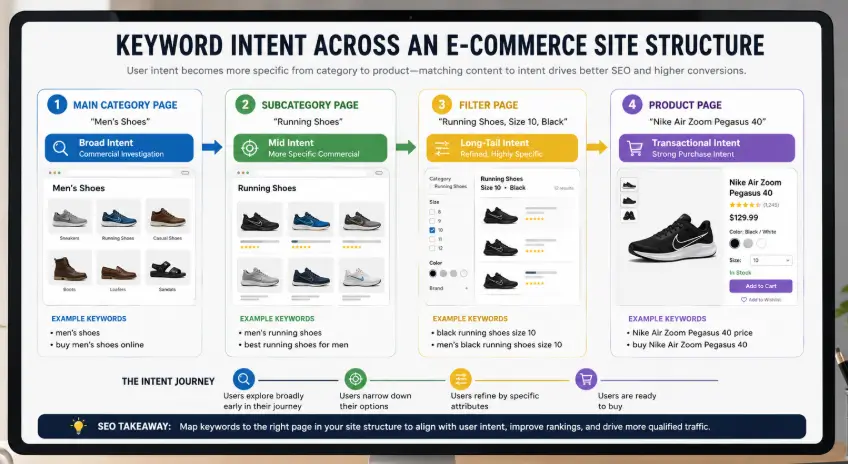
The Best Category Page SEO Template
A category page should not feel like a blog post placed above a product grid. It should feel like a shopping page that gives enough context to help the buyer choose.
Use this structure when building or improving ecommerce category pages.
- Clean URL that matches the category name
- One clear H1 with the primary keyword
- Short intro copy that explains who the category is for
- Helpful filters based on real buyer attributes
- Product grid with clear names, prices, ratings, and availability
- Subcategory links near the top when the category is broad
- Short buying guide below the first product section
- FAQ section that answers buying concerns
- Breadcrumb navigation with structured data
- Internal links to related categories, guides, and services
This template gives Google structure and gives shoppers direction. It also keeps the page from becoming a thin grid with no context.
How to Write Category Page Copy That Helps Buyers
Category copy should not be a block of keywords. It should help shoppers understand the range, compare options, and choose the right path. Keep the top copy short. A long essay above products can hurt the buying flow.
A good intro can answer three things: what products are here, who they are for, and how to choose the right one. The deeper details can sit below the product grid where shoppers can read more if needed.
For example, a hiking boots category could explain waterproof options, ankle support, terrain type, and fit. That is useful content. Repeating hiking boots ten times is not.
For stronger page level optimization, see Rankxon’s guide to on page SEO
Technical SEO for Category Pages
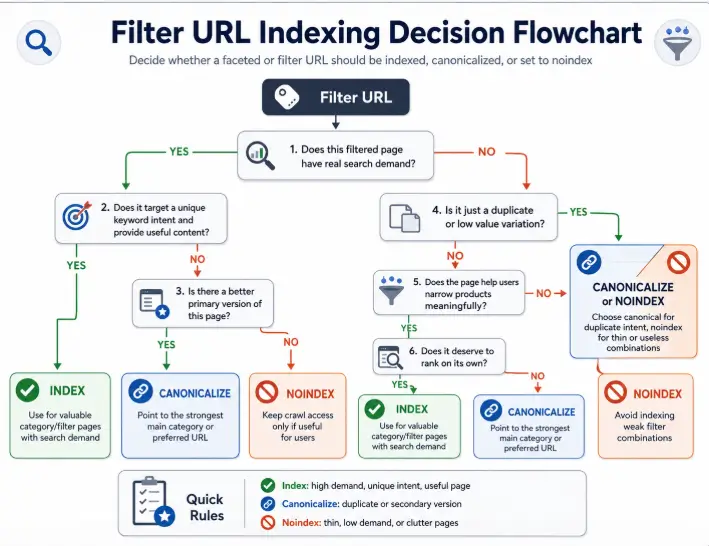
Technical issues can stop category pages from ranking even when the content looks good. The biggest problems usually come from crawl waste, duplicate URLs, weak canonical tags, slow product grids, and messy filter parameters.
Category pages need clean indexation rules. Not every filtered URL deserves to be indexed. A color filter may create dozens of near duplicate pages. A high demand filter such as waterproof running shoes may deserve its own optimized page.
Technical SEO Checklist
| Area | What to Check | Why It Matters |
| Indexation | Only index useful category and subcategory pages | Prevents duplicate pages from competing |
| Canonical tags | Point duplicate filter URLs to the preferred page | Protects ranking signals |
| Pagination | Make paginated product lists crawlable and clear | Helps search engines reach deeper products |
| Facets | Control filters by demand and uniqueness | Stops crawl waste |
| Speed | Compress images and reduce heavy scripts | Improves user experience |
| Schema | Use BreadcrumbList and relevant product data | Clarifies page hierarchy and product facts |
| Internal links | Link from main categories to subcategories and guides | Passes authority to important pages |
For a full ecommerce audit, connect this work with ecommerce SEO
Internal Linking for Category Pages
Internal links tell Google which category pages matter most. They also help shoppers move from broad choices to specific choices. A main category should link to its most valuable subcategories. Blog guides should link back to the matching category page when the user is ready to shop.
Avoid stuffing links in random paragraphs. Use links where they help the reader make the next decision. For example, a guide about choosing office chairs can naturally link to ergonomic office chairs, mesh office chairs, and office chair accessories.
For Rankxon, this article should internally link to related pages using short anchor text such as ecommerce SEO, SEO consulting, keyword research, on page SEO, SEO ranking factors, and AI search checklist.
Category Page SEO Examples and Layout Ideas
The best category pages usually follow a similar pattern. The page opens with a clear category name, a short helpful intro, and visible products. Then it supports browsing with subcategory links, filters, sorting, trust signals, and buying guidance.
A weak category page hides products below long text, uses generic product names, has no unique copy, and allows every filter combination to create indexable URLs. That creates confusion for both users and search engines.
A strong layout does not need to be complex. It needs to be clear. The visitor should understand where they are, what is available, how to narrow choices, and what to do next.
How to Optimize Category Pages for AI Search
AI search tools prefer clear, structured, and consistent information. If your category page is vague, thin, or full of conflicting product data, it is harder for AI tools to use your page as a source.
To improve AI visibility, add direct answer sections, clear product category definitions, structured FAQs, schema, and consistent product attributes. Write in a way that a human can scan and a machine can parse.
Your category pages should clearly state the product group, common use cases, product differences, buyer questions, and related categories. This helps AI tools understand the page as an ecommerce hub, not just a grid of products.
For more AI search structure, use this AI search checklist
Common Category Page SEO Mistakes
- Using one generic description across many categories
- Targeting the same keyword on a category, subcategory, and blog post
- Indexing every filter URL without demand
- Hiding all helpful content at the bottom of the page
- Using vague H1 headings such as Shop All or Products
- Missing breadcrumb navigation
- Using product grids that load too slowly
- Not linking category pages from blogs and menus
- Ignoring out of stock product handling
- Writing for search engines instead of buyers
Most of these issues are fixable. The hard part is knowing which category pages deserve attention first. Start with pages that already get impressions, sit in positions 4 to 20, and target commercial terms.
To understand why some pages rank while others stay stuck, review these SEO ranking factors
30 Day Category Page SEO Action Plan
| Timeframe | Action | Expected Outcome |
| Days 1 to 3 | Export category page traffic, impressions, clicks, and rankings from Google Search Console | Find priority pages |
| Days 4 to 7 | Map one primary keyword and supporting terms to each category | Remove cannibalization |
| Days 8 to 12 | Rewrite titles, meta descriptions, H1s, and short intros | Improve relevance and CTR |
| Days 13 to 17 | Fix internal links from menu, homepage, blogs, and related categories | Improve authority flow |
| Days 18 to 22 | Review filters, canonicals, pagination, speed, and schema | Reduce technical risk |
| Days 23 to 27 | Add FAQs, buying guidance, and useful comparison blocks | Improve user value and AI visibility |
| Days 28 to 30 | Track rankings, CTR, crawl status, and conversion changes | Measure impact |
When Should You Get Help With Category Page SEO?
You should get help when category pages get impressions but not clicks, when many pages target the same keyword, when filtered URLs create crawl waste, or when product pages are indexed but category pages never rank.
A proper review should look at search intent, site architecture, internal links, indexation, category copy, schema, and conversion flow together. Fixing only metadata is rarely enough.
Rankxon can review your category structure through SEO consulting or a full ecommerce SEO audit.
FAQs About Category Page SEO
What is a category in SEO?
A category in SEO is a page or section that groups related content or products under one clear topic. In ecommerce, a category page usually lists related products and targets a broad commercial keyword.
What is a category page?
A category page is a page that groups similar products, services, or articles. In an online store, it helps shoppers browse product groups such as shoes, sofas, laptops, or skincare products.
Is category page SEO only for ecommerce websites?
No. It is most important for ecommerce sites, but service websites, blogs, directories, and marketplaces also use category pages to group related content and improve crawl structure.
How much content should a category page have?
Most category pages need a short helpful intro near the top and deeper buying guidance below the product grid. The goal is clarity, not word count. Useful content beats long keyword filled copy.
Should filtered category pages be indexed?
Only index filtered pages when they match real search demand and offer a unique product set. Most low value filter URLs should use canonical or noindex rules to avoid duplicate content problems.
Is SEO dead or evolving in 2026?
SEO is evolving. Google search, AI Overviews, ChatGPT, Gemini, and shopping assistants need clear structure, useful answers, and trustworthy data. Category page SEO now needs both search visibility and AI readability.
What is the 80 20 rule for SEO?
The 80 20 rule means a small group of pages often produces most of the SEO results. For ecommerce sites, that small group is often high value category pages, not every product page.
Conclusion
Category page SEO is one of the highest value ecommerce growth moves because it improves rankings, crawl paths, product discovery, and conversions at the same time. The page needs to help shoppers first, then give search engines a clean structure to understand.
Start with the pages that already have demand. Fix the keyword mapping, page structure, copy, internal links, filters, and technical signals. Then add clear FAQs and schema so Google and AI search tools can understand the page with less friction.
When category pages become useful hubs instead of thin product grids, they can turn existing ecommerce inventory into long term organic growth.
New to full website optimization? Start with this guide on website SEO
